Plenty of B2B websites lean on cliche stock photos of handshakes, hard hats, and teams in glass boardrooms who have never met each other. Stock photography isn’t the problem on its own. Use stock for atmosphere, and use your own website photography for anything a buyer will judge you on, including your people and your products.
Our article on why website content stalls a project briefly touches on how photos can hold up a launch. Here we look at the decision itself, what to photograph, and how to plan a shoot that gets the site what it needs.
Where stock photography works
To be honest, stock photography works well for many sites. It suits service-based businesses in particular, where there isn’t a tangible product to show. A service firm can build a perfectly credible site on well-chosen stock.
The catch is what stock can be used for. It works for atmospheric imagery and background images, the photo behind a headline or the texture across a section. It stops working the moment a picture claims to show something real about your company.
Never as your team
A stock photo of a posed business team standing in for your own employees is an absolute no-no. Buyers will eventually meet your people, on a call or on a site visit, and the photo becomes the first thing on your site they know wasn’t true.
Never as your products
For a product-based business, stock in place of the products you make or sell is where the real damage happens. It might fool some visitors. The problems start after a buyer receives the items and notices they aren’t quite the same as what was pictured, and at that point it’s a question about your honesty rather than your photography.
Stock Works For
- Background and banner images
- Atmosphere behind a headline
- Services with nothing tangible to show
- Ideas rather than things
Never Use Stock For
- Your team, posed or candid
- The products you make or sell
- Your facility and equipment
- Projects you’ve completed
What to photograph
Plan the shoot around the pages the site needs, which is why it helps to have the site map settled first. For a manufacturer, that usually means the service and product pages a buyer uses to decide whether to get in touch. Within that, a few rules save a second shoot later.
- Every SKU. For a product-based site, a shot of each SKU is critical. Even if you don’t plan to list a product yet, it’s better to have the photo than to set up a reshoot for missing items at a later date.
- More headshots than you think you need. If you’re undecided on who should have one, shoot too many employees rather than too few. Someone left out is a gap on the team page until the next shoot.
- The group shot. This is the one clients most often forget. They do the individual headshots, then regret they didn’t get a collective photo of the whole team.
- People at work. Candid and posed shots of employees, equipment, and offices give the rest of the site something real to show beyond the headshots.
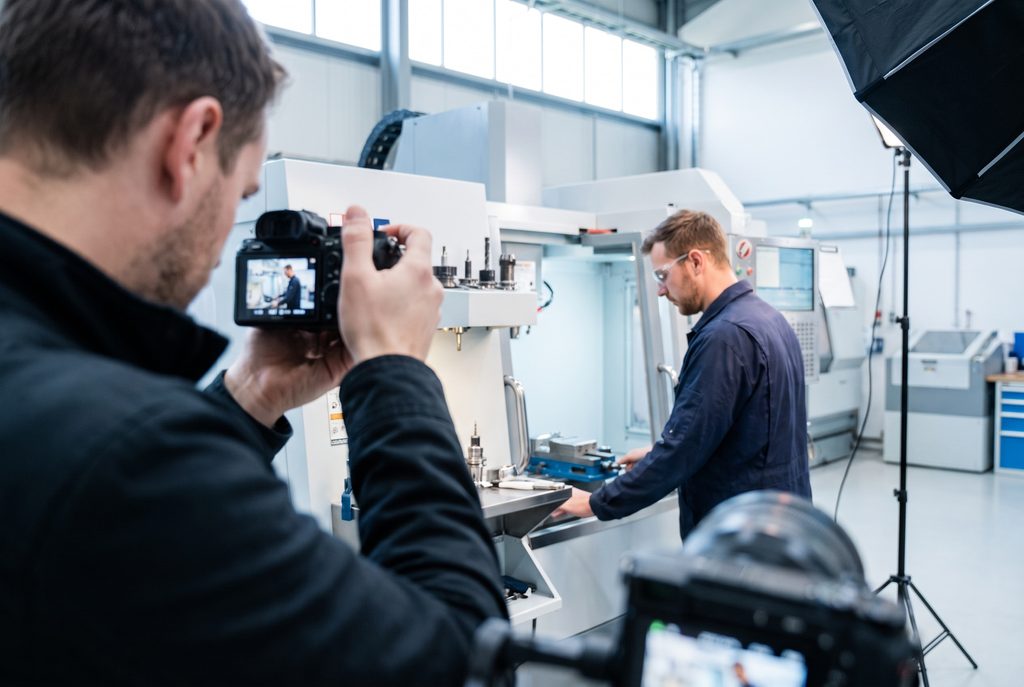
Planning a shoot in a plant or office
An on-site shoot needs planning, and most of it happens before the photographer arrives. The steps run in roughly this order.
Planning an On-Site Shoot
- 1Decide what’s being shot
Headshots, products, and candid or posed shots of people and spaces, then approve the quote. - 2Schedule everyone
The photographer, the marketing team, and the employees being photographed. - 3Set the dress code
Decided by marketing, with a stylist if the budget allows. - 4Write the shot list
Based on what the website needs, ideally after a pre-shoot visit. - 5Prepare the products
Cleaned, labelled, and ready, with someone assigned to help on the day.
Getting everyone in the same place
Once the quote is approved, the shoot needs a date and time that works for the photographer, the marketing team, and the employees being photographed. Someone from marketing should be there on the day to direct the shoot, since the photographer won’t know the facility or which shots matter most to the website.
Everyone also needs to be told how to dress, as decided by the marketing team. Some clients go further and hire a stylist or makeup coordinator to help with everyone’s appearance (and yes, that includes the men).
Headshots need a coordinator of their own. Someone on the client’s side should organize timeslots for people to arrive at the setup location, warn them well in advance, and help them on the day.
A shot list keeps the day moving
For candid and posed photography of employees, equipment, and offices, plan a shot list in advance, based on what the website project is expected to need. It gives the photographer a plan for capturing everything efficiently, rather than wandering the building looking for a good angle. A pre-shoot visit can help here, so the photographer sees the spaces and the light before the day itself.
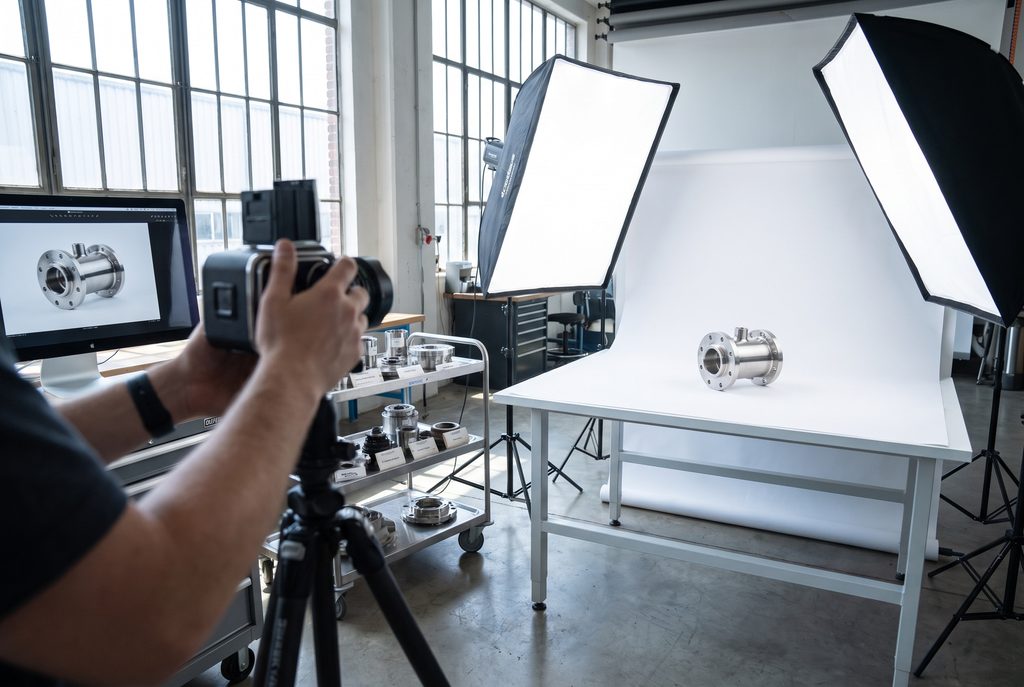
Products need a helper and a clean cloth
Product photography needs its own preparation. The photographer has to understand the approximate size range of everything being shot, because photographing a computer chip is quite different from photographing an industrial vessel. The lighting and the space needed both change with the size.
On the day, the photographer will likely need help with the products, since they won’t know one SKU from another. Label everything so it’s easy to match each photo to the right item. A consistent file naming convention will help the web team once the images are passed on to them.
Assign someone to prepare and clean the products before the shoot as well. Dust, handprints, and scratches all show up on camera. Some can be edited out afterwards, but the better the originals are to start with, the less editing will be required.
Who Needs to Be There
PPE and confidentiality
PPE is usually not an issue, but it does come into play in some facilities, such as electronics manufacturing or food processing. Check the requirements with the photographer ahead of time so they arrive with whatever the facility requires.
We haven’t had a shoot held up by an NDA, but it is still a potential barrier if your warehouse is full of parts made for customers under confidentiality agreements. Decide beforehand what can and can’t appear in frame.
What a shoot day looks like, and what it costs
The photographer has to account for travel and setup time, which can include many locations throughout the building, depending on the type of shoot. Shooting usually starts at around 8 or 9 a.m. and wraps up around 4 p.m. On a multi-day shoot, the equipment can be left in place overnight, so less setup is needed on the days that follow.
In our experience, on-site photography runs from $1,500 to $3,000 per day. Where it falls in that range depends on the travel time, the setup required, the facility size, and the number and type of shots. If you don’t already have your own photographer, Leaf Design has worked for over a decade with a top Toronto-area photographer. If you are interested in obtaining a photography quote as part of your project, don’t hesitate to contact us.
Or take the shoot to a studio
An on-site shoot isn’t the only option, and for some companies an in-studio shoot makes more sense. The photographer doesn’t have to travel (your employees do instead), and they’re working with a permanent setup that’s already dialled in. You also don’t have to clear out a suitable room in your office to serve as a makeshift studio for the day.
A studio works for product photography too, as long as the items are reasonably sized. Products can be dropped off in person or shipped, and the photographer works through the collection from there. Everything needs to arrive well organized, labelled the same way as it would be for an on-site shoot. In return, it cuts out the photographer’s travel and setup time, which is often a significant part of the cost of an on-site shoot, especially one that only runs a single day.
It can sometimes mean a quicker turnaround as well. Rather than waiting for a completely empty day in the photographer’s schedule so they can travel to your site, your products can be shot in batches during gaps across the week.
Can a phone’s camera do the job?
Phone cameras have improved a great deal, and that helps. However, it doesn’t necessarily mean the person holding the phone knows how to frame a shot or get the lighting right. And that is most of what separates a photograph from a snapshot.
Phone shots can work for some levels of portfolio, and they’re good at showing a process or a project in progress. Even there, we would recommend getting high-quality project photos whenever possible. Finished projects are what buyers judge your work by, so they deserve better than a quick snapshot taken on the way out the door.
What about AI-generated photos?
Occasionally, a client will send us AI-generated photos of their employees. And most of the time it’s very obvious. Usually they’ve used a free online tool with limited computational power, and the results fall into “uncanny valley” territory. On top of that, they often don’t match the headshots of existing employees already on the website, so the team page ends up looking like two different groups of people.
There are premium services that can turn a handful of selfies into a professional corporate headshot. If you pay for one and spend the time adjusting the options, the results can be almost imperceptible from the real thing. Most clients don’t invest in a proper tool, though, and their results look unrealistic.
Where we use AI ourselves
We do use AI tools internally on headshots that clients send us, but only to repair them.
- Consistency. Making a set of headshots taken at different times look like they belong together.
- Resolution. Improving a photo that’s too small for where it needs to go.
- Cropping. Expanding an image that’s cropped too tightly, so it shows more of the person’s torso and matches the others.
- Clothing. Changing an outfit when one person isn’t dressed like the rest of the team.
We tend not to make edits to faces for aesthetic or cosmetic reasons. And if a proper photoshoot is done, none of these fixes are needed in the first place.
Show buyers what they’re buying
Stock has a place on almost every site, as long as it stays in the background. Your people and your products are what a buyer is deciding on, and they’re the photos worth paying for. A well-planned shoot day gets you both, and gives the site photos no competitor can use.
If you’re planning a redesign and want to talk through whether a shoot makes sense for your site, feel free to book a discovery call. It’s a useful conversation about your project, with no pitch, and no pressure.